帝国cms 百度编辑器 开启代码模式
内容简介
e\extend\ueditor\ueditor.toolbarconfig.js/*其他的工具栏配置选项自定义即可,编辑器实例化的时候使用 “to
网站描述
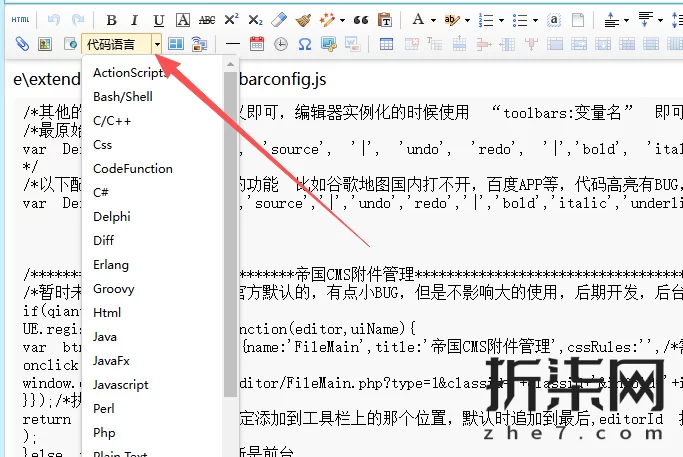
百度编辑器插件
e\extend\ueditor\ueditor.toolbarconfig.js
/*其他的工具栏配置选项自定义即可,编辑器实例化的时候使用 “toolbars:变量名” 即可,比如toolbars:Basic*/
/*最原始的配置
var Default=[[&39;fullscreen&39;, &39;source&39;, &39;|&39;, &39;undo&39;, &39;redo&39;, &39;|&39;,&39;bold&39;, &39;italic&39;, &39;underline&39;, &39;fontborder&39;, &39;strikethrough&39;, &39;superscript&39;, &39;subscript&39;, &39;removeformat&39;, &39;formatmatch&39;, &39;autotypeset&39;, &39;blockquote&39;, &39;pasteplain&39;, &39;|&39;, &39;forecolor&39;, &39;backcolor&39;, &39;insertorderedlist&39;, &39;insertunorderedlist&39;, &39;selectall&39;, &39;cleardoc&39;, &39;|&39;,&39;rowspacingtop&39;, &39;rowspacingbottom&39;, &39;lineheight&39;, &39;|&39;,&39;customstyle&39;, &39;paragraph&39;, &39;fontfamily&39;, &39;fontsize&39;, &39;|&39;,&39;directionalityltr&39;, &39;directionalityrtl&39;, &39;indent&39;, &39;|&39;,&39;justifyleft&39;, &39;justifycenter&39;, &39;justifyright&39;, &39;justifyjustify&39;, &39;|&39;, &39;touppercase&39;, &39;tolowercase&39;, &39;|&39;,&39;link&39;, &39;unlink&39;, &39;anchor&39;, &39;|&39;, &39;imagenone&39;, &39;imageleft&39;, &39;imageright&39;, &39;imagecenter&39;, &39;|&39;,&39;simpleupload&39;, &39;insertimage&39;, &39;emotion&39;, &39;scrawl&39;, &39;insertvideo&39;, &39;music&39;, &39;attachment&39;, &39;map&39;, &39;gmap&39;, &39;insertframe&39;, &39;insertcode&39;, &39;webapp&39;, &39;pagebreak&39;, &39;template&39;, &39;background&39;, &39;|&39;,&39;horizontal&39;, &39;date&39;, &39;time&39;, &39;spechars&39;, &39;snapscreen&39;, &39;wordimage&39;, &39;|&39;,&39;inserttable&39;, &39;deletetable&39;, &39;insertparagraphbeforetable&39;, &39;insertrow&39;, &39;deleterow&39;, &39;insertcol&39;, &39;deletecol&39;, &39;mergecells&39;, &39;mergeright&39;, &39;mergedown&39;, &39;splittocells&39;, &39;splittorows&39;, &39;splittocols&39;, &39;charts&39;, &39;|&39;,&39;print&39;, &39;preview&39;, &39;searchreplace&39;, &39;help&39;, &39;drafts&39;]];
*/
/*以下配置我去除了一些无用的功能 比如谷歌地图国内打不开,百度APP等,代码高亮有BUG,暂时禁用*/
var Default=[[&39;fullscreen&39;,&39;source&39;,&39;|&39;,&39;undo&39;,&39;redo&39;,&39;|&39;,&39;bold&39;,&39;italic&39;,&39;underline&39;,&39;fontborder&39;,&39;strikethrough&39;,&39;superscript&39;,&39;subscript&39;,&39;removeformat&39;,&39;formatmatch&39;,&39;autotypeset&39;,&39;blockquote&39;,&39;pasteplain&39;,&39;|&39;,&39;forecolor&39;,&39;backcolor&39;,&39;insertorderedlist&39;,&39;insertunorderedlist&39;,&39;selectall&39;,&39;cleardoc&39;,&39;|&39;,&39;rowspacingtop&39;,&39;rowspacingbottom&39;,&39;lineheight&39;,&39;|&39;,&39;customstyle&39;,&39;paragraph&39;,&39;fontfamily&39;,&39;fontsize&39;,&39;|&39;,&39;directionalityltr&39;,&39;directionalityrtl&39;,&39;indent&39;,&39;|&39;,&39;justifyleft&39;,&39;justifycenter&39;,&39;justifyright&39;,&39;justifyjustify&39;,&39;|&39;,&39;touppercase&39;,&39;tolowercase&39;,&39;|&39;,&39;link&39;,&39;unlink&39;,&39;anchor&39;,&39;|&39;,&39;imagenone&39;,&39;imageleft&39;,&39;imageright&39;,&39;imagecenter&39;,&39;|&39;,&39;simpleupload&39;,&39;insertimage&39;,&39;scrawl&39;,&39;insertvideo&39;,&39;attachment&39;,&39;map&39;,&39;insertframe&39;,&39;insertcode&39;,&39;template&39;,&39;background&39;,&39;|&39;,&39;horizontal&39;,&39;date&39;,&39;time&39;,&39;spechars&39;,&39;snapscreen&39;,&39;wordimage&39;,&39;|&39;,&39;inserttable&39;,&39;deletetable&39;,&39;insertparagraphbeforetable&39;,&39;insertrow&39;,&39;deleterow&39;,&39;insertcol&39;,&39;deletecol&39;,&39;mergecells&39;,&39;mergeright&39;,&39;mergedown&39;,&39;splittocells&39;,&39;splittorows&39;,&39;splittocols&39;,&39;charts&39;,&39;|&39;,&39;print&39;,&39;preview&39;,&39;searchreplace&39;,&39;help&39;,&39;drafts&39;,&39;|&39;,&39;pagebreak&39;]],/*Basic为测试简版,自己添加需要的即可*/Basic=[[&39;fullscreen&39;,&39;undo&39;,&39;redo&39;,&39;|&39;,&39;bold&39;,&39;italic&39;,&39;underline&39;,&39;fontborder&39;,&39;strikethrough&39;,&39;superscript&39;,&39;subscript&39;,&39;|&39;,&39;removeformat&39;,&39;formatmatch&39;,&39;autotypeset&39;,&39;blockquote&39;,&39;pasteplain&39;,&39;|&39;,&39;forecolor&39;,&39;backcolor&39;,&39;insertorderedlist&39;,&39;insertunorderedlist&39;,&39;|&39;,&39;link&39;,&39;unlink&39;,&39;anchor&39;,&39;|&39;,&39;selectall&39;,&39;cleardoc&39;,&39;|&39;,&39;simpleupload&39;,&39;insertimage&39;,&39;attachment&39;]];


/*********************************帝国cms附件管理***************************************/
/*暂时未做此文件,使用的是官方默认的,有点小BUG,但是不影响大的使用,后期开发,后台更改路径的话,下面也做响应的修改*/
if(qiantai==0){//判断是后台
UE.registerUI(&39;FileMain&39;,function(editor,uiName){
var btn=new UE.ui.Button({name:&39;FileMain&39;,title:&39;帝国CMS附件管理&39;,cssRules:&39;&39;,/*需要添加的额外样式,指定icon图标,这里默认使用一个重复的icon*/
onclick:function(){
window.open(&39;/e/admin/ecmseditor/FileMain.php?type=1&classid=&39;+classid+&39;&infoid=&39;+infoid+&39;&filepass=&39;+filepass+&39;&sinfo=1&doing=1&39;+ehash,&39;&39;,&39;width=700,height=550,scrollbars=yes&39;);
}});/*执行*/
return btn;},58/*index 指定添加到工具栏上的那个位置,默认时追加到最后,editorId 指定这个UI是那个编辑器实例上的,默认是页面上所有的编辑器都会添加这个按钮*/
);
}else if(qiantai==1){//判断是前台

}
前端引入高亮编辑器JS脚本
code-editor.js ↘可在编辑器直接生成js文件下载
// 代码编辑器
// 功能:处理代码高亮和复制,不包含预览功能
// 加载Prism.js
function loadPrism() {
// 检查Prism是否已加载
if (typeof Prism === &39;undefined&39;) {
// 加载Prism核心
const prismCore = document.createElement(&39;script&39;);
prismCore.src = &39;https://cdnjs.cloudflare.com/ajax/libs/prism/1.29.0/prism.min.js&39;;
document.head.appendChild(prismCore);
// 加载Prism组件(支持百度编辑器代码模式的所有语言)
const prismComponents = [
// 基础语言
&39;https://cdnjs.cloudflare.com/ajax/libs/prism/1.29.0/components/prism-markup.min.js&39;,
&39;https://cdnjs.cloudflare.com/ajax/libs/prism/1.29.0/components/prism-css.min.js&39;,
&39;https://cdnjs.cloudflare.com/ajax/libs/prism/1.29.0/components/prism-javascript.min.js&39;,
&39;https://cdnjs.cloudflare.com/ajax/libs/prism/1.29.0/components/prism-php.min.js&39;,
&39;https://cdnjs.cloudflare.com/ajax/libs/prism/1.29.0/components/prism-json.min.js&39;,
// 百度编辑器支持的其他语言
&39;https://cdnjs.cloudflare.com/ajax/libs/prism/1.29.0/components/prism-bash.min.js&39;,
&39;https://cdnjs.cloudflare.com/ajax/libs/prism/1.29.0/components/prism-c.min.js&39;,
&39;https://cdnjs.cloudflare.com/ajax/libs/prism/1.29.0/components/prism-cpp.min.js&39;,
&39;https://cdnjs.cloudflare.com/ajax/libs/prism/1.29.0/components/prism-csharp.min.js&39;,
&39;https://cdnjs.cloudflare.com/ajax/libs/prism/1.29.0/components/prism-go.min.js&39;,
&39;https://cdnjs.cloudflare.com/ajax/libs/prism/1.29.0/components/prism-java.min.js&39;,
&39;https://cdnjs.cloudflare.com/ajax/libs/prism/1.29.0/components/prism-python.min.js&39;,
&39;https://cdnjs.cloudflare.com/ajax/libs/prism/1.29.0/components/prism-ruby.min.js&39;,
&39;https://cdnjs.cloudflare.com/ajax/libs/prism/1.29.0/components/prism-sql.min.js&39;,
&39;https://cdnjs.cloudflare.com/ajax/libs/prism/1.29.0/components/prism-swift.min.js&39;,
&39;https://cdnjs.cloudflare.com/ajax/libs/prism/1.29.0/components/prism-typescript.min.js&39;,
&39;https://cdnjs.cloudflare.com/ajax/libs/prism/1.29.0/components/prism-xml.min.js&39;,
&39;https://cdnjs.cloudflare.com/ajax/libs/prism/1.29.0/components/prism-yaml.min.js&39;
];
prismComponents.forEach(src => {
const script = document.createElement(&39;script&39;);
script.src = src;
document.head.appendChild(script);
});
// 加载Prism样式
const prismStyle = document.createElement(&39;link&39;);
prismStyle.rel = &39;stylesheet&39;;
prismStyle.href = &39;https://cdnjs.cloudflare.com/ajax/libs/prism/1.29.0/themes/prism-tomorrow.min.css&39;;
document.head.appendChild(prismStyle);
}
}
// 加载自定义样式
function loadStyles() {
const style = document.createElement(&39;style&39;);
style.textContent = `
/* 代码容器样式 */
.code-container {
margin: 20px 0;
padding: 0 20px;
}
/* 代码编辑器样式 */
.code-editor {
position: relative;
border-radius: 8px;
overflow: hidden;
box-shadow: 0 2px 10px rgba(0,0,0,0.1);
background-color: 1e1e1e;
max-width: 1200px;
margin: 0 auto;
}
.code-editor-header {
display: flex;
justify-content: space-between;
align-items: center;
padding: 10px 15px;
background-color: 2c3e50;
color: fff;
border-bottom: 1px solid 34495e;
}
.code-editor-title {
font-size: 14px;
font-weight: 600;
}
.code-editor-actions {
display: flex;
gap: 10px;
}
.editor-btn {
padding: 5px 10px;
border: none;
border-radius: 4px;
cursor: pointer;
font-size: 12px;
font-weight: 500;
transition: all 0.3s ease;
display: flex;
align-items: center;
gap: 5px;
}
.copy-btn {
background-color: 2196F3;
color: white;
}
.copy-btn:hover {
background-color: 0b7dda;
transform: translateY(-1px);
box-shadow: 0 2px 8px rgba(33, 150, 243, 0.3);
}
.download-btn {
background-color: 27ae60;
color: white;
}
.download-btn:hover {
background-color: 2ecc71;
transform: translateY(-1px);
box-shadow: 0 2px 8px rgba(39, 174, 96, 0.3);
}
.code-editor-content {
position: relative;
max-height: 600px;
overflow-y: auto;
overflow-x: auto;
background-color: 1e1e1e;
border-radius: 0 0 8px 8px;
}
.code-editor-content pre {
margin: 0;
padding: 20px;
overflow-x: auto;
font-family: &39;Fira Code&39;, &39;Consolas&39;, &39;Monaco&39;, &39;Courier New&39;, monospace;
font-size: 14px;
line-height: 1.5;
white-space: pre-wrap;
word-wrap: break-word;
width: 100%;
box-sizing: border-box;
}
.code-editor-content code {
font-family: inherit;
font-size: inherit;
white-space: pre-wrap;
word-wrap: break-word;
display: block;
width: 100%;
box-sizing: border-box;
}
/* 代码编辑器滚动条样式 */
.code-editor-content::-webkit-scrollbar {
width: 8px;
height: 8px;
}
.code-editor-content::-webkit-scrollbar-track {
background: 2d2d2d;
}
.code-editor-content::-webkit-scrollbar-thumb {
background: 555;
border-radius: 4px;
}
.code-editor-content::-webkit-scrollbar-thumb:hover {
background: 777;
}
/* 生成文件弹窗样式 */
.file-generator-modal {
position: fixed;
top: 0;
left: 0;
width: 100%;
height: 100%;
background-color: rgba(0, 0, 0, 0.5);
display: flex;
justify-content: center;
align-items: center;
z-index: 10000;
}
.file-generator-content {
background-color: 2c3e50;
color: white;
padding: 30px;
border-radius: 8px;
box-shadow: 0 4px 20px rgba(0, 0, 0, 0.3);
width: 90%;
max-width: 400px;
}
.file-generator-header {
display: flex;
justify-content: space-between;
align-items: center;
margin-bottom: 20px;
}
.file-generator-title {
font-size: 18px;
font-weight: 600;
}
.file-generator-close {
background: none;
border: none;
color: white;
font-size: 24px;
cursor: pointer;
padding: 0;
width: 30px;
height: 30px;
display: flex;
justify-content: center;
align-items: center;
border-radius: 4px;
transition: background-color 0.3s ease;
}
.file-generator-close:hover {
background-color: rgba(255, 255, 255, 0.1);
}
.file-generator-form {
display: flex;
flex-direction: column;
gap: 15px;
}
.form-group {
display: flex;
flex-direction: column;
gap: 5px;
}
.form-group label {
font-size: 14px;
font-weight: 500;
}
.form-group input,
.form-group select {
padding: 10px;
border: 1px solid 34495e;
border-radius: 4px;
background-color: 1e1e1e;
color: white;
font-size: 14px;
}
.form-group input:focus,
.form-group select:focus {
outline: none;
border-color: 2196F3;
box-shadow: 0 0 0 2px rgba(33, 150, 243, 0.2);
}
/* 确保下拉菜单显示在下面 */
.form-group select {
appearance: none;
-webkit-appearance: none;
-moz-appearance: none;
background-image: url(&39;data:image/svg+xml;utf8,&39;);
background-repeat: no-repeat;
background-position: right 10px center;
background-size: 12px 6px;
}
/* 可编辑代码区域 */
.code-editor-content pre {
margin: 0;
padding: 20px;
overflow-x: auto;
font-family: &39;Fira Code&39;, &39;Consolas&39;, &39;Monaco&39;, &39;Courier New&39;, monospace;
font-size: 14px;
line-height: 1.5;
white-space: pre-wrap;
word-wrap: break-word;
width: 100%;
box-sizing: border-box;
}
.code-editor-content code {
font-family: inherit;
font-size: inherit;
white-space: pre-wrap;
word-wrap: break-word;
display: block;
width: 100%;
box-sizing: border-box;
}
/* 编辑按钮样式 */
.edit-btn {
background-color: 9b59b6;
color: white;
}
.edit-btn:hover {
background-color: 8e44ad;
transform: translateY(-1px);
box-shadow: 0 2px 8px rgba(155, 89, 182, 0.3);
}
/* 代码编辑器文本域 */
.code-editor-textarea {
margin: 0;
padding: 20px;
overflow-x: auto;
font-family: &39;Fira Code&39;, &39;Consolas&39;, &39;Monaco&39;, &39;Courier New&39;, monospace;
font-size: 14px;
line-height: 1.5;
white-space: pre-wrap;
word-wrap: break-word;
width: 100%;
box-sizing: border-box;
border: none;
background-color: 1e1e1e;
color: white;
resize: none;
}
/* 代码编辑器滚动条样式 */
.code-editor-content::-webkit-scrollbar,
.code-editor-textarea::-webkit-scrollbar {
width: 8px;
height: 8px;
}
.code-editor-content::-webkit-scrollbar-track,
.code-editor-textarea::-webkit-scrollbar-track {
background: 2d2d2d;
}
.code-editor-content::-webkit-scrollbar-thumb,
.code-editor-textarea::-webkit-scrollbar-thumb {
background: 555;
border-radius: 4px;
}
.code-editor-content::-webkit-scrollbar-thumb:hover,
.code-editor-textarea::-webkit-scrollbar-thumb:hover {
background: 777;
}
.file-generator-actions {
display: flex;
gap: 10px;
justify-content: flex-end;
margin-top: 20px;
}
.modal-btn {
padding: 10px 20px;
border: none;
border-radius: 4px;
cursor: pointer;
font-size: 14px;
font-weight: 500;
transition: all 0.3s ease;
}
.cancel-btn {
background-color: 7f8c8d;
color: white;
}
.cancel-btn:hover {
background-color: 95a5a6;
}
.download-btn {
background-color: 27ae60;
color: white;
}
.download-btn:hover {
background-color: 2ecc71;
}
/* 响应式设计 */
@media (max-width: 768px) {
.code-container {
padding: 0 10px;
}
.code-editor {
max-width: 100%;
}
.code-editor-header {
flex-direction: column;
align-items: flex-start;
gap: 10px;
padding: 15px;
}
.code-editor-actions {
align-self: flex-end;
}
.code-editor-content {
max-height: 400px;
}
.code-editor-content pre {
padding: 15px;
font-size: 13px;
}
}
`;
document.head.appendChild(style);
}
// 解码HTML实体
function decodeHtmlEntities(text) {
// 处理非标准的HTML实体,如&39;
let decodedText = text;
decodedText = decodedText.replace(/&39;/g, &39;);
decodedText = decodedText.replace(//g, &39;&39;);
decodedText = decodedText.replace(//g, &39;>&39;);
decodedText = decodedText.replace(/&/g, &39;&&39;);
// 使用标准方法解码其他HTML实体
const txt = document.createElement(&39;textarea&39;);
txt.innerHTML = decodedText;
return txt.value;
}
// 渲染代码
function renderCode(containerId, codeData) {
const container = document.getElementById(containerId);
if (!container) return;
// 加载Prism和样式
loadPrism();
loadStyles();
// 生成唯一ID
const uniqueId = &39;code_editor_&39; + codeData.id + &39;_&39; + Math.random().toString(36).substr(2, 9);
// 检测代码语言(从代码内容或元素属性中)
function detectLanguage(code) {
// 基于代码内容的简单语言检测
if (code.includes(&39; {
if (typeof Prism !== &39;undefined&39;) {
Prism.highlightAll();
}
}, 100);
}
// 复制代码功能
function copyCode(codeId) {
const codeElement = document.getElementById(codeId);
if (!codeElement) return;
const codeText = codeElement.textContent;
navigator.clipboard.writeText(codeText).then(function() {
// 找到复制按钮
const button = codeElement.closest(&39;.code-editor&39;).querySelector(&39;.copy-btn&39;);
if (button) {
const originalText = button.textContent;
button.textContent = &39;复制成功!&39;;
button.style.backgroundColor = &39;4CAF50&39;;
// 2秒后恢复按钮状态
setTimeout(function() {
button.textContent = originalText;
button.style.backgroundColor = &39;2196F3&39;;
}, 2000);
}
}).catch(function(err) {
console.error(&39;复制失败:&39;, err);
const button = codeElement.closest(&39;.code-editor&39;).querySelector(&39;.copy-btn&39;);
if (button) {
const originalText = button.textContent;
button.textContent = &39;复制失败&39;;
button.style.backgroundColor = &39;f44336&39;;
setTimeout(function() {
button.textContent = originalText;
button.style.backgroundColor = &39;2196F3&39;;
}, 2000);
}
});
}
// 显示文件生成器弹窗
function showFileGenerator(codeId) {
// 创建弹窗元素
const modal = document.createElement(&39;div&39;);
modal.className = &39;file-generator-modal&39;;
modal.id = &39;fileGeneratorModal&39;;
// 添加点击空白处关闭的事件
modal.addEventListener(&39;click&39;, function(e) {
if (e.target === modal) {
closeFileGenerator();
}
});
// 弹窗内容
modal.innerHTML = `
生成文件 × 文件名称 文件格式
HTML (.html) CSS (.css) JavaScript (.js) TypeScript (.ts) XML (.xml) JSON (.json) YAML (.yaml)
微信小程序WXML (.wxml) 微信小程序WXSS (.wxss) 微信小程序JSON (.json) 头条小程序TTML (.ttml) 头条小程序TTSS (.ttss) QML (.qml)
Swift (.swift) Kotlin (.kt) Dart (.dart) Java (.java)
PHP (.php) Python (.py) C (.c) C++ (.cpp) C (.cs) Go (.go) Ruby (.rb) Rust (.rs) Scala (.scala)
SQL (.sql) Markdown (.md)
Shell Script (.sh) Batch File (.bat) Properties (.properties) Environment (.env)
文本 (.txt) 取消 确定 `;
// 添加到文档
document.body.appendChild(modal);
}
// 关闭文件生成器弹窗
function closeFileGenerator() {
const modal = document.getElementById(&39;fileGeneratorModal&39;);
if (modal) {
modal.remove();
}
}
// 生成文件
function generateFile(codeId) {
const codeElement = document.getElementById(codeId);
if (!codeElement) return;
// 获取用户输入
const fileName = document.getElementById(&39;fileName&39;).value || &39;code&39;;
const fileFormat = document.getElementById(&39;fileFormat&39;).value;
// 获取代码内容
const codeText = codeElement.textContent;
// 创建Blob对象
const blob = new Blob([codeText], { type: &39;text/plain&39; });
// 创建下载链接
const url = URL.createObjectURL(blob);
const a = document.createElement(&39;a&39;);
a.href = url;
a.download = fileName + fileFormat;
a.click();
// 释放URL对象
setTimeout(() => {
URL.revokeObjectURL(url);
}, 100);
// 关闭弹窗
closeFileGenerator();
// 显示成功提示
const button = codeElement.closest(&39;.code-editor&39;).querySelector(&39;.download-btn&39;);
if (button) {
const originalText = button.textContent;
button.textContent = &39;生成成功!&39;;
button.style.backgroundColor = &39;4CAF50&39;;
// 2秒后恢复按钮状态
setTimeout(function() {
button.textContent = originalText;
button.style.backgroundColor = &39;27ae60&39;;
}, 2000);
}
}
// 切换编辑模式
function toggleEditMode(codeId) {
const codeElement = document.getElementById(codeId);
const textareaElement = document.getElementById(&39;textarea_&39; + codeId);
const toolbarElement = document.getElementById(&39;toolbar_&39; + codeId);
const preElement = codeElement.closest(&39;pre&39;);
if (!codeElement || !textareaElement || !toolbarElement || !preElement) return;
// 保存原始高度
const originalHeight = preElement.offsetHeight;
// 显示工具栏和文本域
toolbarElement.style.display = &39;flex&39;;
textareaElement.style.display = &39;block&39;;
codeElement.style.display = &39;none&39;;
// 设置文本域内容
textareaElement.value = codeElement.textContent;
// 调整文本域高度和样式
textareaElement.style.height = originalHeight + &39;px&39;;
textareaElement.style.fontFamily = &39;Fira Code, Consolas, Monaco, Courier New, monospace&39;;
textareaElement.style.fontSize = &39;14px&39;;
textareaElement.style.lineHeight = &39;1.5&39;;
textareaElement.style.padding = &39;20px&39;;
textareaElement.style.border = &39;none&39;;
textareaElement.style.backgroundColor = &39;1e1e1e&39;;
textareaElement.style.color = &39;white&39;;
textareaElement.style.resize = &39;none&39;;
textareaElement.style.boxSizing = &39;border-box&39;;
textareaElement.style.width = &39;100%&39;;
textareaElement.style.overflowX = &39;auto&39;;
// 设置文本域变化监听器
setupTextareaListener(codeId);
}
// 撤回更改
function undoChange(codeId) {
const history = window.codeHistory[codeId];
if (!history || history.index = history.history.length - 1) return;
history.index++;
const textareaElement = document.getElementById(&39;textarea_&39; + codeId);
if (textareaElement) {
textareaElement.value = history.history[history.index];
}
}
// 保存更改
function saveChanges(codeId) {
const textareaElement = document.getElementById(&39;textarea_&39; + codeId);
const codeElement = document.getElementById(codeId);
const toolbarElement = document.getElementById(&39;toolbar_&39; + codeId);
if (!textareaElement || !codeElement || !toolbarElement) return;
// 获取新代码内容
const newCode = textareaElement.value;
// 更新代码元素
codeElement.textContent = newCode;
// 更新历史记录
const history = window.codeHistory[codeId];
if (history) {
// 移除当前索引之后的历史记录
history.history = history.history.slice(0, history.index + 1);
// 添加新的历史记录
history.history.push(newCode);
history.index++;
}
// 隐藏工具栏和文本域
toolbarElement.style.display = &39;none&39;;
textareaElement.style.display = &39;none&39;;
codeElement.style.display = &39;block&39;;
// 重新应用语法高亮
setTimeout(() => {
if (typeof Prism !== &39;undefined&39;) {
Prism.highlightAll();
}
}, 100);
}
// 取消编辑
function cancelEdit(codeId) {
const textareaElement = document.getElementById(&39;textarea_&39; + codeId);
const codeElement = document.getElementById(codeId);
const toolbarElement = document.getElementById(&39;toolbar_&39; + codeId);
if (!textareaElement || !codeElement || !toolbarElement) return;
// 隐藏工具栏和文本域
toolbarElement.style.display = &39;none&39;;
textareaElement.style.display = &39;none&39;;
codeElement.style.display = &39;block&39;;
}
// 监听文本域变化,自动保存到历史记录
function setupTextareaListener(codeId) {
const textareaElement = document.getElementById(&39;textarea_&39; + codeId);
if (!textareaElement) return;
let timeoutId;
textareaElement.addEventListener(&39;input&39;, function() {
clearTimeout(timeoutId);
timeoutId = setTimeout(() => {
const history = window.codeHistory[codeId];
if (history) {
const currentValue = textareaElement.value;
const lastValue = history.history[history.index];
if (currentValue !== lastValue) {
// 移除当前索引之后的历史记录
history.history = history.history.slice(0, history.index + 1);
// 添加新的历史记录
history.history.push(currentValue);
// 限制历史记录长度
if (history.history.length > 50) {
history.history.shift();
history.index--;
} else {
history.index++;
}
}
}
}, 500);
});
}前端引入自动检测代码格式脚本
auto-code-detector.js ↘可在编辑器直接生成js文件下载
注意代码最后又一个 /code-editor.js 需要自己修改路径
// 代码自动检测器
// 功能:自动检测文章中的代码内容并应用代码编辑器样式

// 页面加载完成后初始化
document.addEventListener(&39;DOMContentLoaded&39;, function() {
    // 自动检测文章中的代码
    autoDetectCode();
});

// 自动检测文章中的代码
function autoDetectCode() {
    // 查找文章内容容器
    const contentContainers = [
        &39;.website-detail .detail-text&39;,
        &39;.article-content&39;,
        &39;.content&39;,
        &39;.post-content&39;
    ];

    let contentElement = null;
    for (const selector of contentContainers) {
        contentElement = document.querySelector(selector);
        if (contentElement) {
            break;
        }
    }

    if (!contentElement) {
        // 如果没有找到特定的内容容器,尝试查找所有包含代码的元素
        processAllCodeElements();
        return;
    }

    // 处理内容容器中的代码
    processCodeInElement(contentElement);
}

// 处理所有代码元素
function processAllCodeElements() {
    // 查找所有pre标签和code标签
    const codeElements = document.querySelectorAll(&39;pre, code&39;);
    codeElements.forEach((element, index) => {
        processCodeElement(element, index);
    });
}

// 处理内容容器中的代码
function processCodeInElement(element) {
    // 查找所有pre标签和code标签
    const codeElements = element.querySelectorAll(&39;pre, code&39;);
    codeElements.forEach((codeElement, index) => {
        processCodeElement(codeElement, index);
    });
}

// 处理单个代码元素
function processCodeElement(element, index) {
    // 跳过已经处理过的元素
    if (element.classList.contains(&39;code-processed&39;)) {
        return;
    }

    // 获取代码内容
    let codeContent = element.textContent || element.innerText;

    // 跳过空元素或内容太少的元素
    if (!codeContent || codeContent.trim().length < 10) {
        return;
    }

    // 生成唯一ID
    const uniqueId = &39;auto_code_&39; + index + &39;_&39; + Date.now();

    // 创建代码容器
    const container = document.createElement(&39;div&39;);
    container.id = uniqueId;
    container.className = &39;code-container&39;;

    // 替换原元素
    element.parentNode.replaceChild(container, element);

    // 标记为已处理
    container.classList.add(&39;code-processed&39;);

    // 渲染代码
    const codeData = {
        id: index,
        code: codeContent
    };

    // 确保renderCode函数存在
    if (typeof renderCode === &39;function&39;) {
        renderCode(uniqueId, codeData);
    } else {
        // 如果renderCode函数不存在,加载code-renderer.js
        loadCodeRenderer(uniqueId, codeData);
    }
}

// 加载代码编辑器
function loadCodeRenderer(containerId, codeData) {
    const script = document.createElement(&39;script&39;);
    script.src = &39;/code-editor.js&39;;
    script.onload = function() {
        if (typeof renderCode === &39;function&39;) {
            renderCode(containerId, codeData);
        }
    };
    document.head.appendChild(script);
}

// 重新检测代码(用于动态加载内容后)
window.recheckCode = function() {
    autoDetectCode();
};
菜鸟必看
JS就是要添加到模板底部的
还有,整好了记得清理浏览器缓存,否则会掉头发
给小白留个作业:代码行数和编辑模式下的 【撤回、还原、保存、取消按钮】请自己看本页里的js吧。