宝塔服务器添加 访问子目录需要验证码功能
内容简介
在网站根目录创建 verify.php 文件代码复制到里面<?phpsession_start();// 获取子目录路径$request_uri = $
网站描述
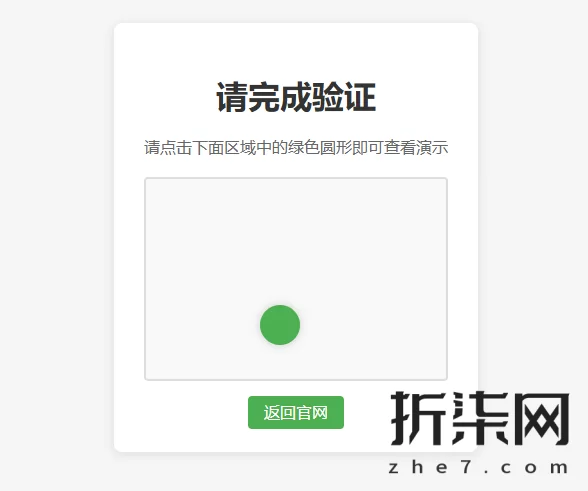
在网站根目录创建 verify.php 文件
代码复制到里面
<?php
session_start();

// 获取子目录路径
$request_uri = $_SERVER[&39;REQUEST_URI&39;];
$path_parts = explode(&39;/&39;, trim($request_uri, &39;/&39;));
$current_dir = $path_parts[0];

// 检查是否已验证
if (isset($_COOKIE[&39;verified_&39; . $current_dir]) && $_COOKIE[&39;verified_&39; . $current_dir] == &39;1&39;) {
    // 重定向到原始请求
    header(&39;Location: &39; . $_SERVER[&39;REQUEST_URI&39;]);
    exit;
}

// 验证提交
if (isset($_POST[&39;x&39;]) && isset($_POST[&39;y&39;]) && isset($_SESSION[&39;target_x&39;]) && isset($_SESSION[&39;target_y&39;])) {
    $click_x = intval($_POST[&39;x&39;]);
    $click_y = intval($_POST[&39;y&39;]);
    $target_x = $_SESSION[&39;target_x&39;];
    $target_y = $_SESSION[&39;target_y&39;];

    // 检查点击位置是否在目标区域内(目标大小为40x40)
    if (abs($click_x - $target_x) <= 20 && abs($click_y - $target_y) <= 20) {
        setcookie(&39;verified_&39; . $current_dir, &39;1&39;, time() + 1800, &39;/&39; . $current_dir);
        // 重定向到原始请求
        header(&39;Location: &39; . $_SERVER[&39;REQUEST_URI&39;]);
        exit;
    }
}

// 生成随机目标位置(在300x200的区域内)
$target_x = rand(30, 270);
$target_y = rand(30, 170);
$_SESSION[&39;target_x&39;] = $target_x;
$_SESSION[&39;target_y&39;] = $target_y;

// 显示验证页面
echo &39;<!DOCTYPE html>
<html>
<head>
    <title>请完成验证</title>
    <style>
        body {
            font-family: Arial, sans-serif;
            background-color: f5f5f5;
            display: flex;
            justify-content: center;
            align-items: center;
            height: 100vh;
            margin: 0;
        }
        .captcha-container {
            background-color: white;
            padding: 30px;
            border-radius: 8px;
            box-shadow: 0 2px 10px rgba(0,0,0,0.1);
            text-align: center;
        }
        h1 {
            color: 333;
            margin-bottom: 20px;
        }
        .click-area {
            width: 300px;
            height: 200px;
            border: 2px solid ddd;
            border-radius: 4px;
            position: relative;
            margin: 20px auto;
            cursor: crosshair;
            background-color: f9f9f9;
        }
        .target {
            width: 40px;
            height: 40px;
            border-radius: 50%;
            background-color: 4CAF50;
            position: absolute;
            transform: translate(-50%, -50%);
            box-shadow: 0 0 10px rgba(0,0,0,0.2);
        }
        .instruction {
            margin: 10px 0;
            color: 666;
        }
    </style>
</head>
<body>
    <div class=captcha-container>
        <h1>请完成验证</h1>
        <p class=instruction>请点击下面区域中的绿色圆形即可查看演示</p>
        <form method=post action= id=verify-form>
            <input type=hidden name=x id=click-x>
            <input type=hidden name=y id=click-y>
            <div class=click-area id=click-area>
                <div class=target style=left: &39; . $target_x . &39;px; top: &39; . $target_y . &39;px;></div>
            </div>
            <div style=margin-top: 20px;>
              <a href=https://www.zhe7.com/ style=padding: 8px 16px; margin: 0 10px; background-color: 4CAF50; color: white; text-decoration: none; border-radius: 4px;>返回官网</a>
            </div>
        </form>
    </div>
    <script>
        document.getElementById(click-area).addEventListener(click, function(e) {
            var rect = this.getBoundingClientRect();
            var x = e.clientX - rect.left;
            var y = e.clientY - rect.top;

            document.getElementById(click-x).value = x;
            document.getElementById(click-y).value = y;
            document.getElementById(verify-form).submit();
        });
    </script>
</body>
</html>&39;;
?>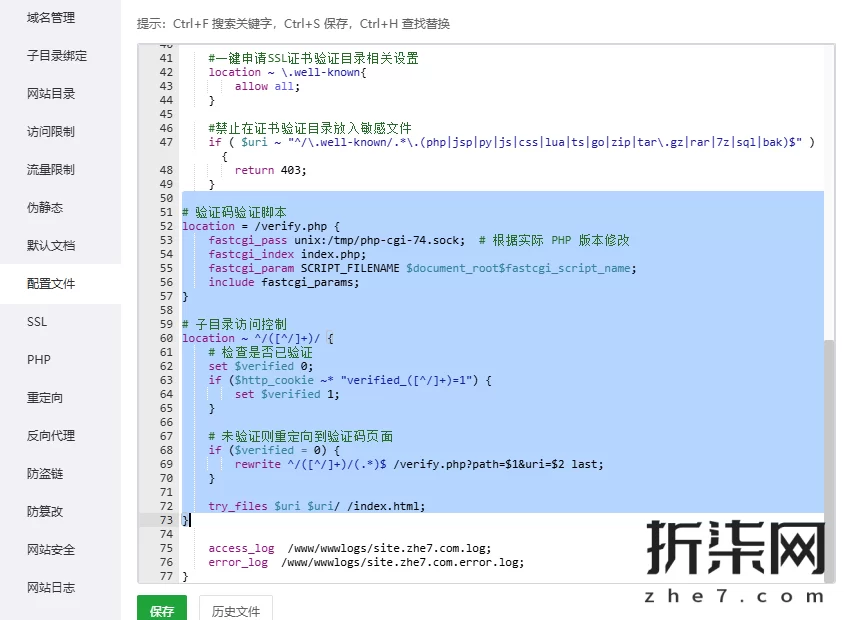
然后在宝塔-网站的配置文件里 底部添加
 验证码验证脚本
location = /verify.php {
    fastcgi_pass unix:/tmp/php-cgi-74.sock;   根据实际 PHP 版本修改
    fastcgi_index index.php;
    fastcgi_param SCRIPT_FILENAME $document_root$fastcgi_script_name;
    include fastcgi_params;
}

 子目录访问控制
location ~ ^/([^/]+)/ {
     检查是否已验证
    set $verified 0;
    if ($http_cookie ~* verified_([^/]+)=1) {
        set $verified 1;
    }

     未验证则重定向到验证码页面
    if ($verified = 0) {
        rewrite ^/([^/]+)/(.*)$ /verify.php?path=$1&uri=$2 last;
    }

    try_files $uri $uri/ /index.html;
}